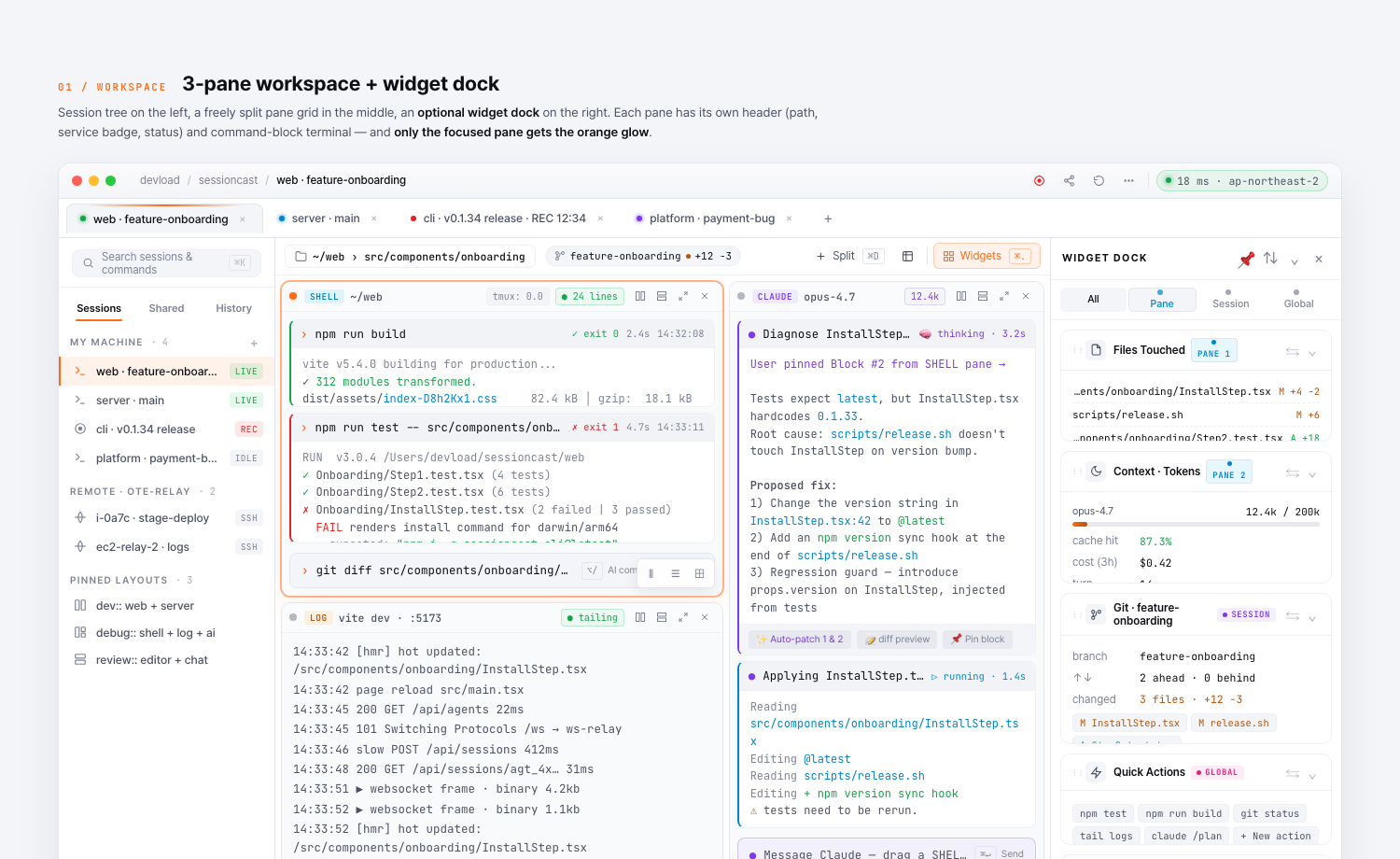
We’ve rebuilt the SessionCast web client around how you actually work — purpose-built for remote terminals where AI agents, build logs, and long-running shells share one screen. Multi-tab workspaces, up to 8 split panes per workspace, and a scope-aware widget dock — all designed for the way SessionCast sessions are actually used.
What’s new
- Multi-session tabs across the top — each tab is one workspace with its own panes.
- Session split — open multiple terminals side-by-side in a single tab.
- Widget Dock with scope — every widget now declares whether it’s bound to the active pane, the session, or your account.
- Polished chrome — focused pane outline, live ring on the active session, status footer with always-on signals.
Design tokens
A consistent set of color tokens (--scope-pane, --scope-session, --scope-global, command-block status stripes, pane type labels) replaces ad-hoc colors across the app, including the session list, the dock, and the terminal header. The same tokens drive both light and dark themes.
Where to find it
The new workspace ships today at app.sessioncast.io. Just sign in — every session you already have works exactly as before, only with the new chrome around it.