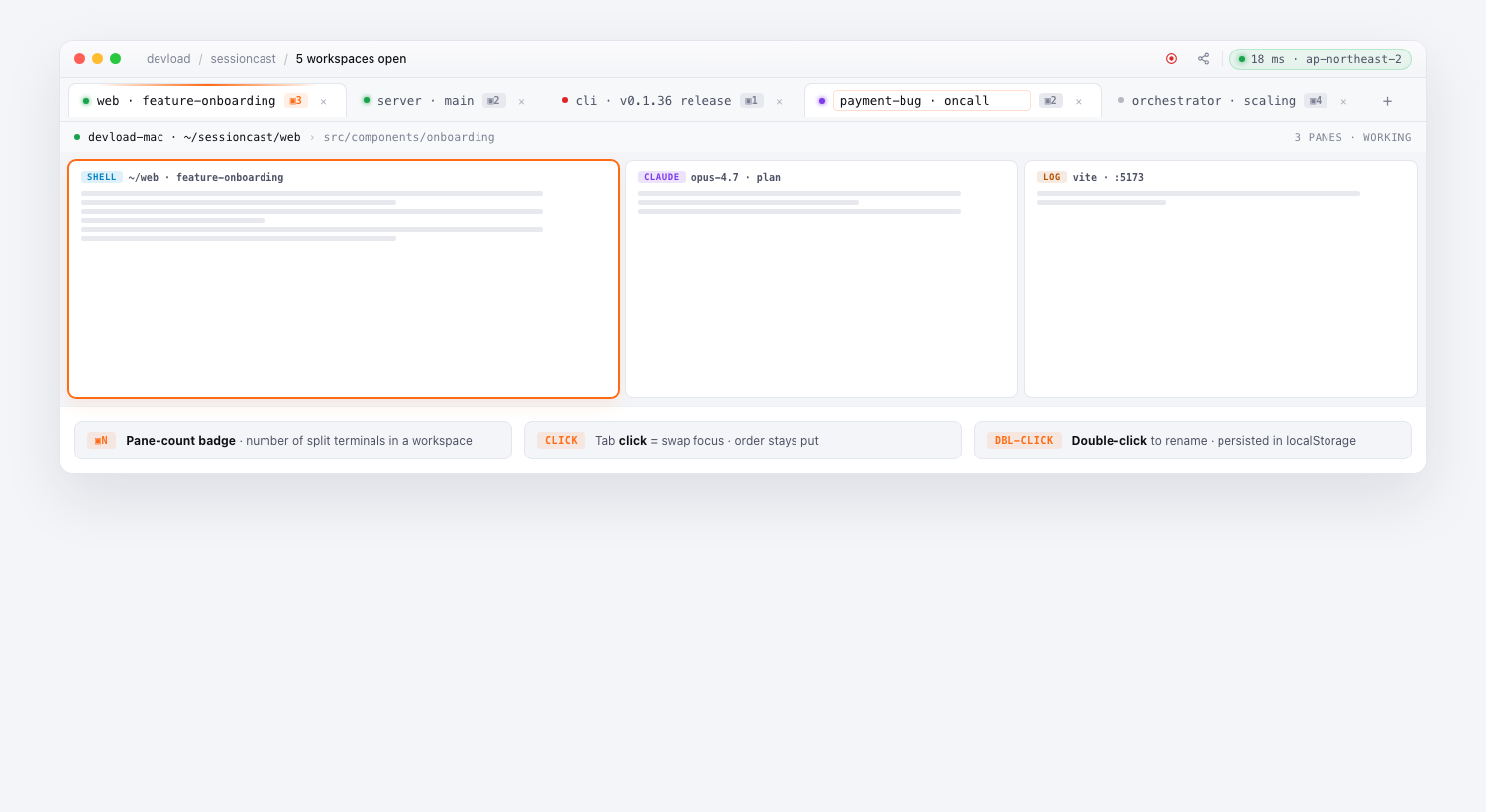
The top bar is now a browser-style tab strip for sessions. Open as many workspaces as you like, jump between them with a click, and give each one a memorable name.
Behaviour
- Append-only order — clicking a tab just changes which one is active; the strip never reshuffles itself on every focus change.
- Double-click any tab to rename — names persist in
localStorage, so2026-06-30 staging deploysurvives reloads. - Pane-count chip on each tab — when a workspace has more than one split, the tab shows a small
3 paneschip so you can tell crowded tabs from single-session ones at a glance. - Status dot — live (green), waiting (amber), error (red), offline (grey) — at a glance.
×removes a tab from the strip (it does NOT kill the session — the agent keeps running).
Layout presets
Splits inside a tab snap to a small set of presets via ⌘⇧1 (single), ⌘⇧2 (side-by-side), ⌘⇧3 (cockpit), ⌘⇧4 (quad), ⌘0 (free / 5+ panes). Pinned Layouts in the sidebar let you save your own combinations and re-open them with one click.
Workspace ≠ session
A workspace tab is just a memorable handle around one or more sessions. Closing a tab never kills work; reopening one resumes everything exactly where it left off.