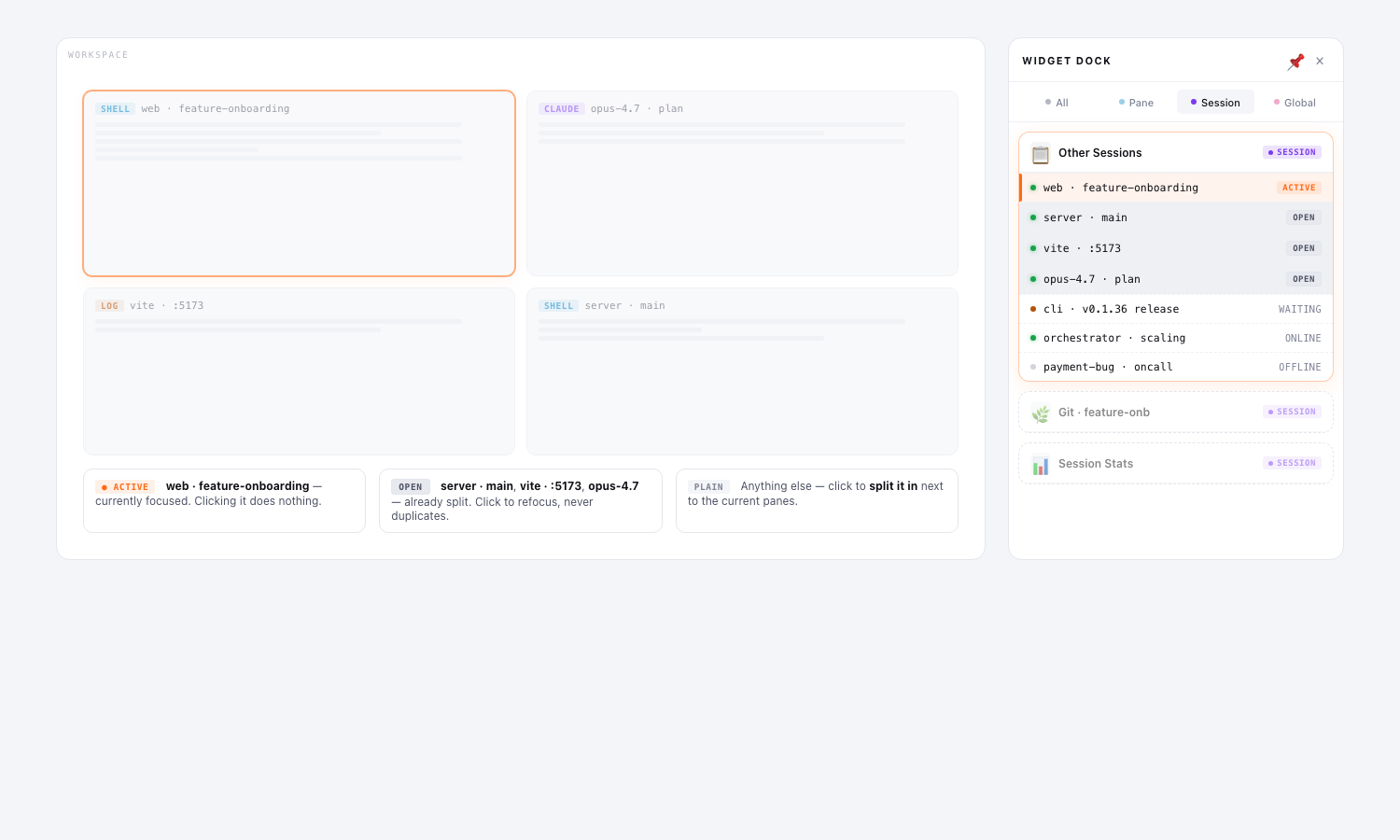
The new Other Sessions widget shows every session on the current machine in one card, with a three-state badge telling you exactly what’s where.
Three states at a glance
ACTIVE(orange) — the session you’re currently focused on. Clicking it is a no-op (you’re already there).OPEN(neutral) — already mounted as a split pane in this workspace. Clicking just brings focus to it — no duplicate, no extra tab.- (plain row) — not split yet. Clicking adds it as a new pane next to the others (or, on mobile, swaps to it).
Why this is useful
Multi-pane workspaces get crowded fast. The widget answers two questions you ask constantly:
- Which terminals do I have open right now? — ACTIVE + OPEN rows are visually distinct.
- Where will this click take me? — the tooltip tells you (“Click to split” vs “Already open as a split pane”).
Available now
app.sessioncast.io — open the right-hand dock and look for the Other Sessions card (now part of the default widget set). The same widget ships in the SessionCast Desktop beta.